

Interactive Artifacts turn Sweep’s Salesforce metadata analysis into shareable, interactive mini-apps your team can explore together. They’re built for admins, RevOps, consultants, engineering, and leaders who need fast alignment during Salesforce cleanup, change impact analysis, and migration planning. Instead of relying on spreadsheets or screenshots, teams can review the same metadata findings with built-in context, including metadata dependencies and structured metadata documentation.
If you’ve ever run a Salesforce cleanup or migration project, you know the real work isn’t the analysis. It’s the alignment.
The findings live in spreadsheets. The logic lives in Setup. The decisions happen in meetings. And the context gets lost somewhere between Slack threads and screenshots. Salesforce metadata isn’t just complex. It’s hard to share.
Interactive Artifacts change that by turning Sweep’s Salesforce metadata analysis into shareable, interactive mini-apps. So instead of debating what’s true, your team can explore the same source of truth and make decisions faster.
Today, we’re excited to launch Interactive Artifacts.
Sweep’s Metadata Agent can already answer deep questions about your Salesforce org. Interactive Artifacts take that one step further by turning those answers into something you can explore visually without exporting data, rebuilding dashboards, or rewriting technical context.
Instead of reading long explanations or exporting data to a spreadsheet, you get an artifact that acts like a mini dashboard built specifically for your question. It’s structured, interactive, and designed for decision-making.
Artifacts help turn Salesforce metadata analysis into an experience your whole team can understand, with supporting visuals and details you can drill into, including metadata dependencies that matter for risk and planning.
Salesforce work rarely happens in isolation.
An admin might be responsible for configuration. RevOps might own the process. A consultant might be driving a Salesforce cleanup plan. Leadership might need a simple way to understand impact and risk. And engineering might need clear metadata dependencies before they sign off.
Artifacts make metadata analysis easier to share across all of those roles. You don’t have to turn your work into screenshots or rewrite technical detail into a status update. You can share the artifact itself, and everyone can explore the same findings in context.
Interactive Artifacts are designed to guide your team from high-level signal to detailed action without losing the context that makes Salesforce metadata analysis actually useful.
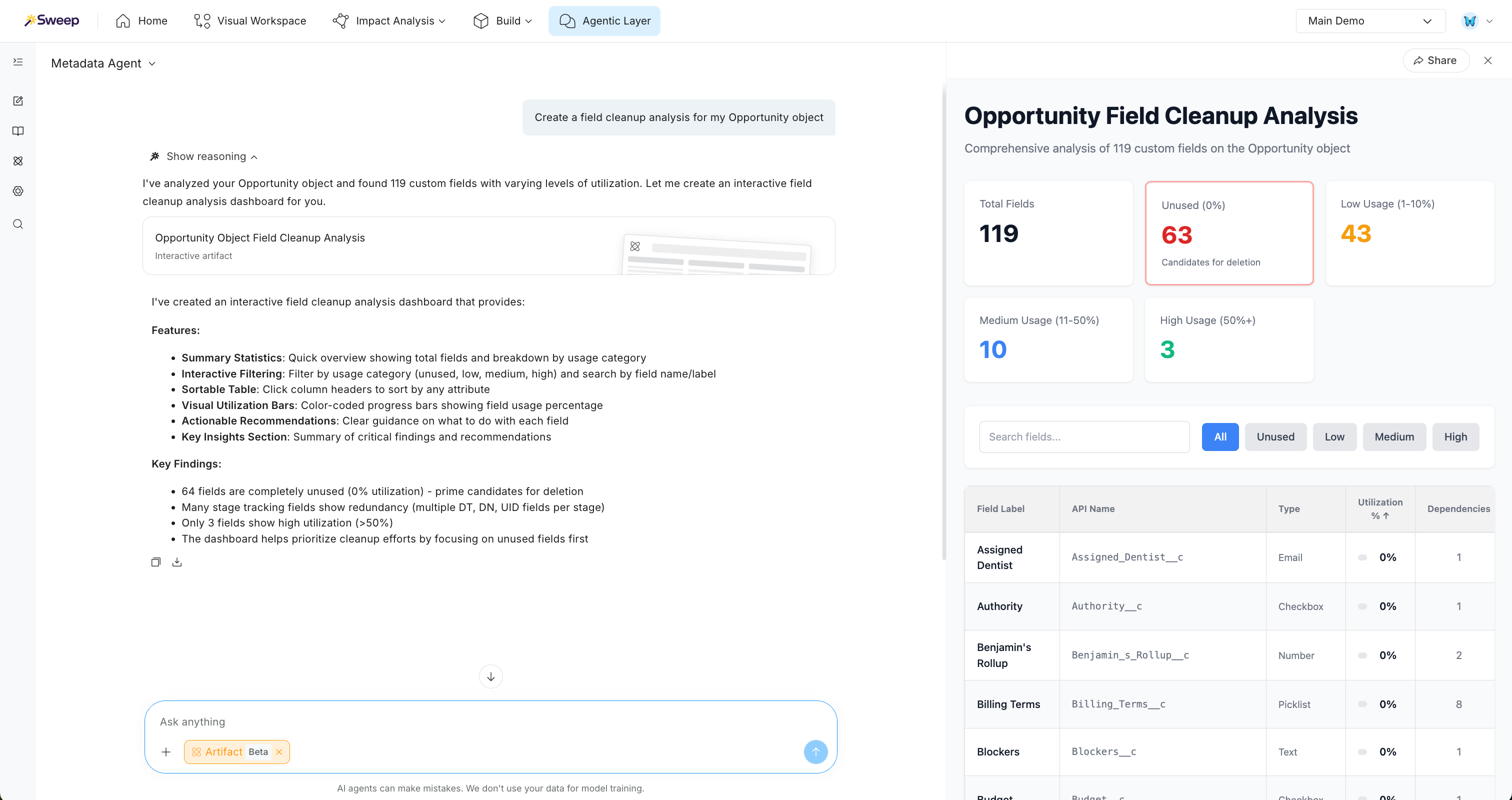
Artifacts begin with summary metrics so you can immediately understand scale and urgency. You might see how many fields were analyzed, how many have high-priority risk, or how many appear unused. From there, the artifact visualizes patterns using charts so you can spot where problems cluster and what categories are driving complexity.
When you need to narrow scope, filters let you drill into exactly what matters. You can focus on high-priority items, isolate unused fields, or explore findings by category. And when it’s time to act, artifacts include clean, structured tables that make it easy to scan, sort, and review the details without leaving the page.
Artifacts begin with summary metrics so you can immediately understand scale and urgency. You might see how many fields were analyzed, how many have high-priority risk, or how many appear unused. From there, the artifact visualizes patterns using charts so you can spot where problems cluster and what categories are driving complexity.
Interactive Artifacts are powered by Sweep’s Metadata Agent, which performs deep Salesforce metadata analysis across your org — including usage patterns, ownership signals, and metadata dependencies that impact safety and scope.
That means you’re not just getting a dashboard. You’re getting an interactive output built directly from Sweep’s analysis engine, so teams can collaborate with the same structured source of truth.
If you’re new to Sweep, here’s the bigger picture of what we’re building and why it matters: Why Sweep.
One of the biggest challenges in Salesforce projects is getting everyone aligned on what’s true.
Artifacts make sharing straightforward. You can send a link to teammates or stakeholders so they can interact with the same output you are looking at. That means fewer back-and-forth Slack threads, fewer “can you screenshot that?” requests, and fewer meetings spent re-explaining how you got to a recommendation.
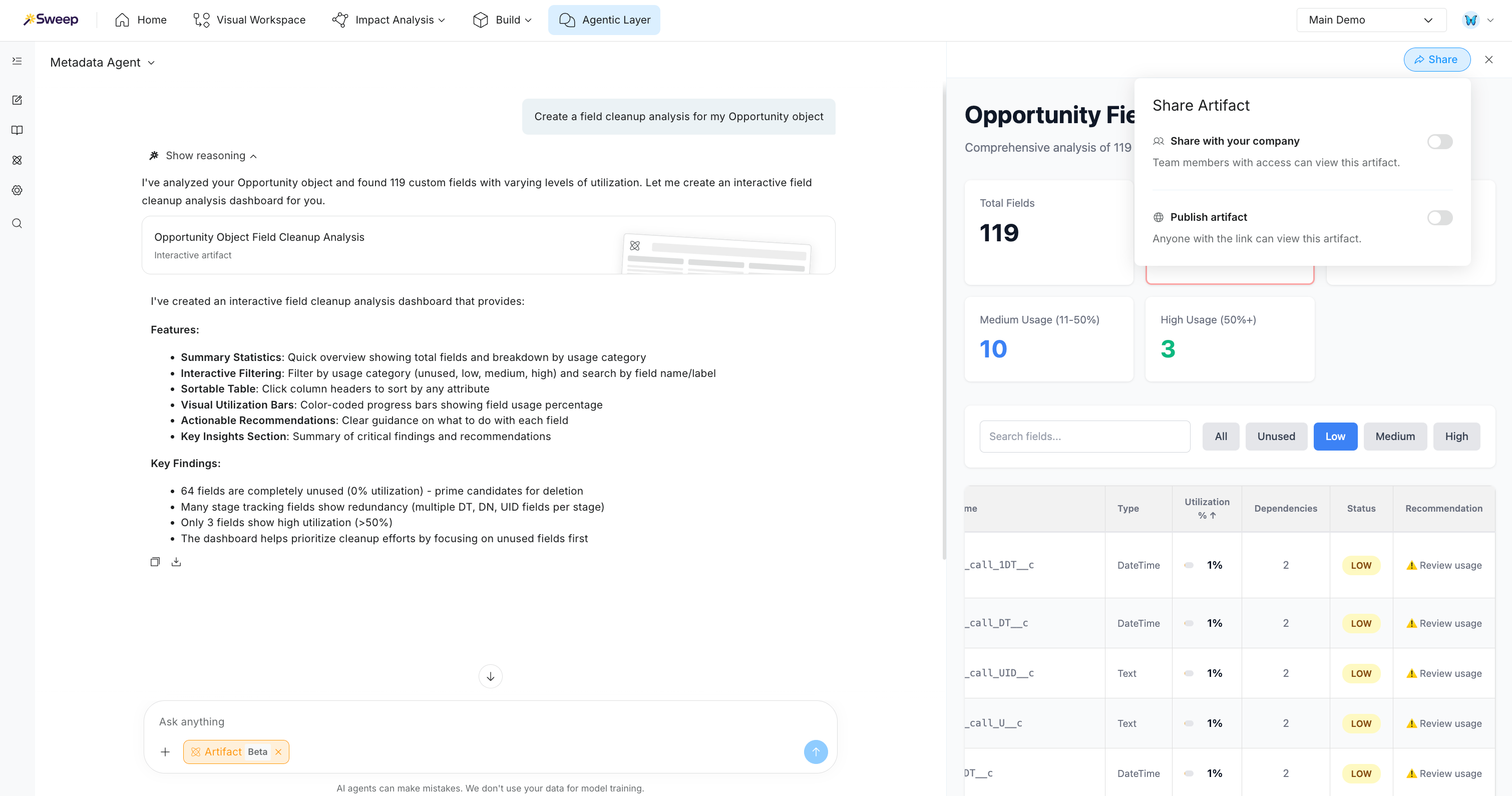
Artifacts are especially useful when you need async collaboration. Stakeholders can review on their own time, ask better questions, and come to decision points with the same shared context.
Interactive Artifacts shine when analysis is large, complex, or hard to communicate.
Metadata cleanup and field rationalization becomes dramatically easier when you can see which fields are unused, which ones are low usage, and which ones are tied to automations or dependencies. Instead of arguing over whether something is safe to remove, teams can validate it together with the same artifact view.
Change impact analysis is another place artifacts help teams move faster. Before changing a field or adjusting automation, you need to know what depends on it. Artifacts help you explore the connected logic and dependencies, which reduces risk and speeds up release planning.
Org audits and migration planning also benefit because artifacts create outputs that feel immediately shareable. Instead of building spreadsheets and formatting charts manually, you can generate an artifact that already communicates what matters and can be explored live during reviews.
And for stakeholder updates, artifacts reduce the gap between technical detail and decision-making. You can share something interactive and understandable without spending extra time converting your findings into slides.
Interactive Artifacts are designed to help teams collaborate faster, streamline Salesforce projects, and make confident changes with shared visibility.
If you want to see what this looks like in your org, book a demo and we’ll walk you through artifacts live, including how to generate cleanup analyses, explore dependencies, and share findings with stakeholders.